
Back pain isn’t a minor comfort issue. It’s a workplace cost, a compliance risk, and a design failure. UK data from the Office for National Statistics and HSE shows that musculoskeletal disorders linked to poor seating ergonomics cost the UK economy £2.3 billion annually, while low back pain accounted for 119 million working days lost in 2021/22 according to this UK back pain and seating overview. For a Facilities Manager planning a major office refresh, that changes the conversation. Chairs for back problems shouldn’t be treated as a furniture line item. They should be treated as core infrastructure.
Most buying guides miss the core issue. A chair that works well in an open-plan setting may be the wrong choice inside an acoustic pod. A highly focused pod can improve concentration, but it can also encourage static sitting. That is the Posture Paradox. The best results come from matching the chair to the environment, then supporting both with better zoning, movement, acoustics, and workstation setup.
Table of Contents
- The Escalating Cost of Workplace Back Pain in the UK
- Essential Ergonomic Chair Features That Prevent Back Problems
- The Posture Paradox Seating for Pods vs Open Plan
- Your Procurement Checklist for Health-First Seating
- Building a Complete Ergonomic Ecosystem
- Smart Budgeting Pod Hire and the Circular Economy
- Create a Healthier Workplace Today
The Escalating Cost of Workplace Back Pain in the UK
Millions of UK working days are lost every year to musculoskeletal problems, and back pain sits near the centre of that bill. For a Facilities Manager, that is not a wellbeing side issue. It is an operating cost that shows up in absence, weaker concentration, more DSE interventions, and lower confidence in the workplace.
The mistake is treating seating as a commodity line in procurement. It is infrastructure. If the chair fails, the employee compensates. They lean forward, perch on the edge of the seat, brace through the shoulders, or stop changing posture because the mechanism fights them. Those habits build discomfort into the working day.
Cheap chairs create expensive patterns.
A poor chair does not just irritate someone with an existing condition. It increases the chance of pain developing in the first place, then keeps that pain active through repeated exposure. The cost lands in small, familiar places. More workstation complaints. More informal desk swaps. More manager conversations about discomfort. More lost time that never appears neatly on a furniture spreadsheet.
The context matters as much as the chair. That is the posture paradox many workplace planners miss. In open-plan areas, people often hold one exposed desk position for too long because concentration is already under pressure. In acoustic pods, they tend to lean into calls, laptops, and short bursts of focused work that create a different strain pattern. Buying one standard chair for both settings looks efficient on paper and performs badly in practice.
Practical rule: If a chair cannot adapt to the user and the work setting, the organisation is building discomfort into the layout.
Facilities teams should widen the brief. Chair selection works best alongside screen setup, desk height, acoustic control, and movement habits. A worker in a noisy, exposed workstation often shortens their posture and stiffens through the upper back. A worker in a pod may sit more intensively for calls and heads-down tasks, which demands different support and easier movement. Broader workplace injury prevention tips help, but the workplace still needs furniture that matches real behaviour.
That is why product choice needs more discipline. A stack of generic operator chairs will not solve a mixed workplace. Facilities teams reviewing ergonomic mesh desk chairs for office use should assess where each chair will sit, how long people will use it there, and what posture that zone tends to produce.
Finance teams often push back on upfront cost. They are asking the wrong question. The fundamental question is whether the chair reduces repeat problems over five to seven years of daily use.
A sensible specification should test these points:
- Can the chair adjust cleanly for different body sizes and desk heights
- Does the backrest support movement instead of forcing a rigid posture
- Is the seat suitable for the actual environment, including pods versus open plan
- Will the specification cut repeat complaints, reassessments, and ad hoc fixes
| Risk area | What poor seating causes | What better specification supports |
|---|---|---|
| Attendance | More absence linked to recurring discomfort | Fewer avoidable pain triggers |
| Productivity | Shorter concentration span and lower task endurance | Better comfort over a full working day |
| Compliance | More DSE issues and reactive workstation changes | Easier assessment and clearer fit for users |
| Workplace experience | Staff avoid certain desks, zones, or pod settings | Greater trust in the office setup |
Back pain is rarely just an employee problem. It is usually a design problem. Fix the seating specification, match it to the environment, and the business stops paying for the same mistake twice.
Essential Ergonomic Chair Features That Prevent Back Problems
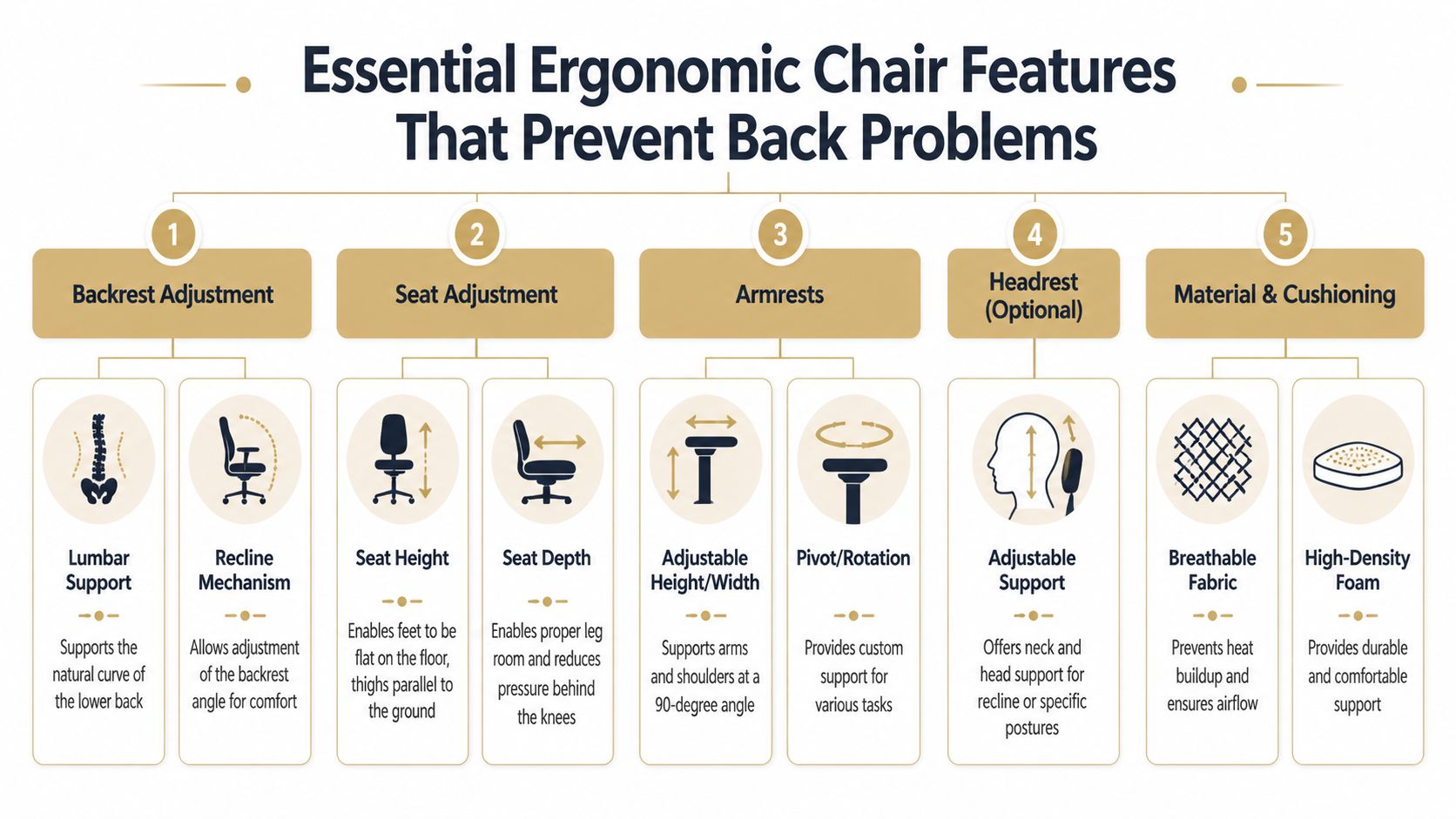
Most chair specs are padded with marketing language. Facilities managers need to ignore that and focus on the mechanics. A good chair for back pain does three things well. It supports the spine, fits the user, and allows movement without losing support.
Dynamic lumbar support matters more than soft cushioning
The backrest is the first place to be demanding. Ergonomic chairs with dynamic lumbar support are critical because fixed postures increase intradiscal pressure by up to 40%, while chairs that mimic spinal flexion can reduce paraspinal muscle fatigue by 25-30% over an 8-hour shift according to UK-based ergonomic findings referenced here.
That matters because many “supportive” chairs are only static. They feel firm in a showroom, then fail over a full day because the user keeps shifting while the chair doesn’t. Dynamic lumbar support follows movement. It doesn’t force one rigid position.
A slightly reclined working posture is usually better than bolt upright sitting. The chair should support movement and recline rather than trap the user in a fixed angle.
The best approach is to shortlist chairs with:
- Height-adjustable lumbar support so the curve meets the user’s lower back properly
- Responsive backrests that move with the body instead of resisting every shift
- Controlled recline so support stays consistent through the day
Seat fit decides whether posture holds up all day
The seat pan does more damage than most buyers realise. If the seat is too deep, staff perch forward and lose back support. If it’s too shallow, weight distribution suffers and stability drops. A poor seat edge adds pressure behind the knees and encourages constant fidgeting for the wrong reasons.
A solid specification includes adjustable seat height, adjustable seat depth, and a waterfall edge. Those features aren’t optional for mixed workforces. They are basic fit requirements.
A chair should fit the person in minutes, not require the person to tolerate it for months.
For teams managing both office and home-working requests, it also helps to direct staff to practical setup guidance outside the workplace. PosturaZen’s guide to home posture is useful because many back complaints begin with inconsistent habits across multiple locations, not just one office chair.
Facilities teams refreshing a large floorplate should also separate “executive-looking” from “ergonomically sound”. Bulky chairs often look impressive and perform badly. Breathable mesh task seating with proper adjustment is usually the better long-term decision. A useful benchmark for that category is this selection of ergonomic mesh desk chairs, where adjustability and airflow matter more than visual bulk.
Armrests are part of spinal support
Armrests are often treated as a secondary feature. That’s a mistake. If the armrests don’t meet the desk and task properly, the shoulders lift, the upper back tightens, and the lower back pays for it later.
The strongest options include 4D armrests, meaning they adjust in height, width, depth, and angle. That lets the chair support different typing positions, laptop use, note-taking, and phone calls without forcing the arms to hang unsupported or the shoulders to round forward.
A practical buying filter works well here:
- Reject fixed armrests for general office use.
- Test width adjustment for different body frames and desk layouts.
- Check pivot and depth for users who switch between keyboard work and collaborative tasks.
- Match armrest range to desk height before approving the chair, not afterwards.
Headrests can help in some roles, especially for longer reclined work or touchdown areas, but they’re not essential on every task chair. Lumbar support, seat fit, and armrest adjustability come first. Get those right and the chair will do most of the heavy lifting.
The Posture Paradox Seating for Pods vs Open Plan
A good chair doesn’t perform the same way everywhere. That’s the detail most buyers miss. The environment changes how people sit, how long they stay still, and whether they use the chair’s adjustment range at all.
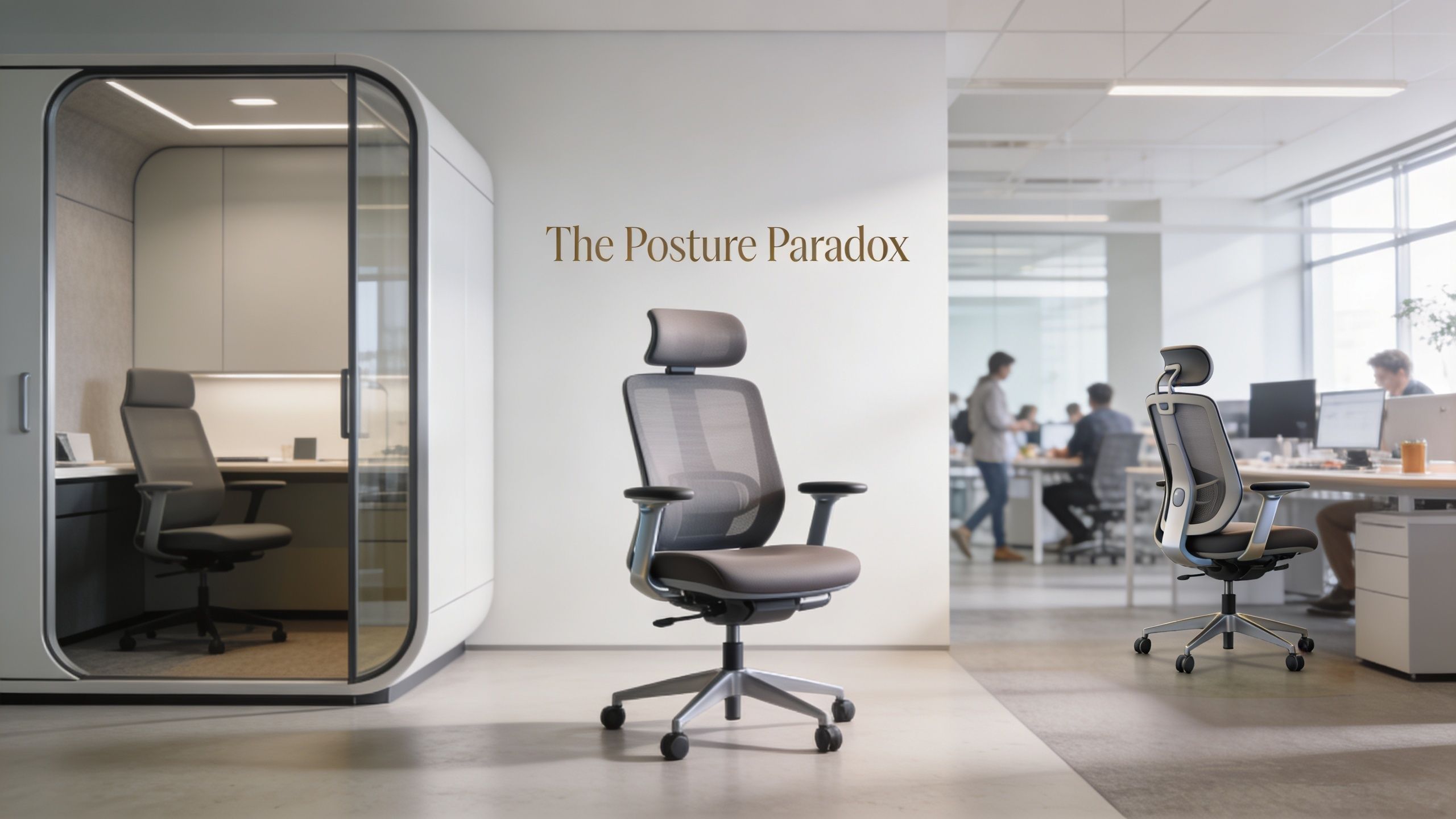
Research highlights a real gap here. A slightly reclined posture of 100 to 120 degrees can reduce pressure on spinal discs, but there is minimal guidance on whether users maintain these postures differently in isolated pods versus distraction-filled open offices according to this discussion of seating posture and workspace context. That gap matters because facilities teams are now mixing open desks, booths, focus pods, and collaboration zones in one project.
Why pods change behaviour
Acoustic pods improve privacy and cut distraction. That’s good for concentration. It can also lead to longer uninterrupted sitting. A person in a quiet pod may settle into deep work and move less. A person in open plan may shift more often because colleagues, noise, and visual activity keep breaking posture.
That is the Posture Paradox. The pod supports focus, but focus can create static posture. So the seating inside the pod needs to encourage movement, not just comfort.
For workplace teams redesigning floorplates, this is exactly why open-plan strategy and pod strategy must be considered together. A broader rethink of layout is covered in this guide to rethinking open-plan office design, especially where focused work, calls, and collaboration need clearly separated settings.
What to specify in pods and what to specify in open plan
Pods should not be treated like miniature meeting rooms filled with generic seating. Different pod uses demand different chair behaviour.
For single-person focus pods and call booths, chair selection should prioritise:
- Smooth recline with support so the user can vary posture while staying productive
- Compact footprint so the chair doesn’t overpower the pod interior
- Useful arm adjustment for laptop and keyboard tasks in a tighter space
- Easy controls because nobody wants to hunt for levers inside a booth
That’s particularly relevant when specifying enclosed work settings such as Framery pods, Kabin acoustic pods, BlockO pods, or Vetrospace meeting pods. Each creates a different behavioural setting. The chair should match the use case, not just the finishes.
Open-plan desks need something slightly different. In exposed shared areas, staff often switch tasks, speak with colleagues, and move around more. Here, the chair must support quick adjustment, easy ingress and egress, and frequent short-duration use across different users.
Selection rule: Pod seating should promote supported movement during focus. Open-plan seating should promote easy adjustment across changing tasks and users.
A short visual walkthrough helps clarify how workspace setting changes behaviour and posture:
There’s also a practical distinction between internal and external environments. Teams using detached buildings or overflow spaces should think about how external office pods from The Meeting Pod Co create a new ergonomic setting altogether. The acoustic separation, travel pattern, and meeting style are different from an internal booth, so seating decisions should be made accordingly.
The wrong procurement habit is buying one chair model and spreading it everywhere. The right one is zoning seating by behaviour. That’s where back pain prevention becomes smarter.
Your Procurement Checklist for Health-First Seating
Buying chairs for back problems without a checklist is how organisations overspend and still end up with complaints. Procurement needs structure. It also needs the confidence to reject chairs that look good on paper but fail in real use.
According to the Health and Safety Executive, musculoskeletal disorders make up 40% of all work-related ill health cases in the UK, and investing in fully adjustable chairs that support proper ergonomic assessment can reduce these risks by 20-25% according to this UK ergonomics summary. That makes due diligence straightforward. Better seating is part of risk reduction.
What to verify before placing an order
Use a procurement filter that tests compliance, fit, and long-term value.
- Check adjustability first. A chair should offer meaningful adjustment in seat height, seat depth, back support, and armrests. If adjustment is limited, the chair is limited.
- Confirm DSE suitability. The chair must support Display Screen Equipment requirements in actual workstation conditions, not just catalogue claims.
- Review standards and certification. Ask for evidence against relevant office chair standards such as BS EN 1335 where applicable.
- Assess warranty and serviceability. A strong warranty matters, but parts availability matters more. A chair with replaceable components is more useful than one that must be fully replaced after wear.
- Check material durability. Fabrics, mesh, foam density, and mechanisms should suit the intensity of the workplace. A chair for a lightly used private office may fail quickly in a busy shared touchdown area.
What a proper chair trial looks like
Many trials are too short and too narrow. One senior person sits in the sample chair for ten minutes and approves it. That isn’t a trial. It’s a showroom reaction.
A proper trial should include:
- A mixed user group with different heights, builds, and job roles
- Different settings such as open plan, touchdown desks, and pod-based work
- A realistic trial period long enough for staff to test the chair through normal tasks
- Simple feedback criteria covering comfort, ease of adjustment, and task suitability
| Procurement question | Weak answer | Strong answer |
|---|---|---|
| Can most staff adjust it easily | “Probably” | “Yes, controls are intuitive and labelled” |
| Does it fit different body types | “It’s one size fits all” | “It has enough range for varied users” |
| Is it repairable | “Unsure” | “Yes, parts and aftercare are available” |
| Will it suit pods and open plan | “Same chair everywhere” | “Specified by zone and task” |
Poor procurement usually starts with one bad assumption. That all chairs called ergonomic are equal.
Health-first seating demands more discipline than that. The reward is fewer reactive fixes, fewer avoidable complaints, and a workplace that feels properly thought through.
Building a Complete Ergonomic Ecosystem
A chair can’t solve a bad workstation. If the desk is too high, the monitor is too low, and the space is noisy, even a strong ergonomic chair won’t deliver what it should.
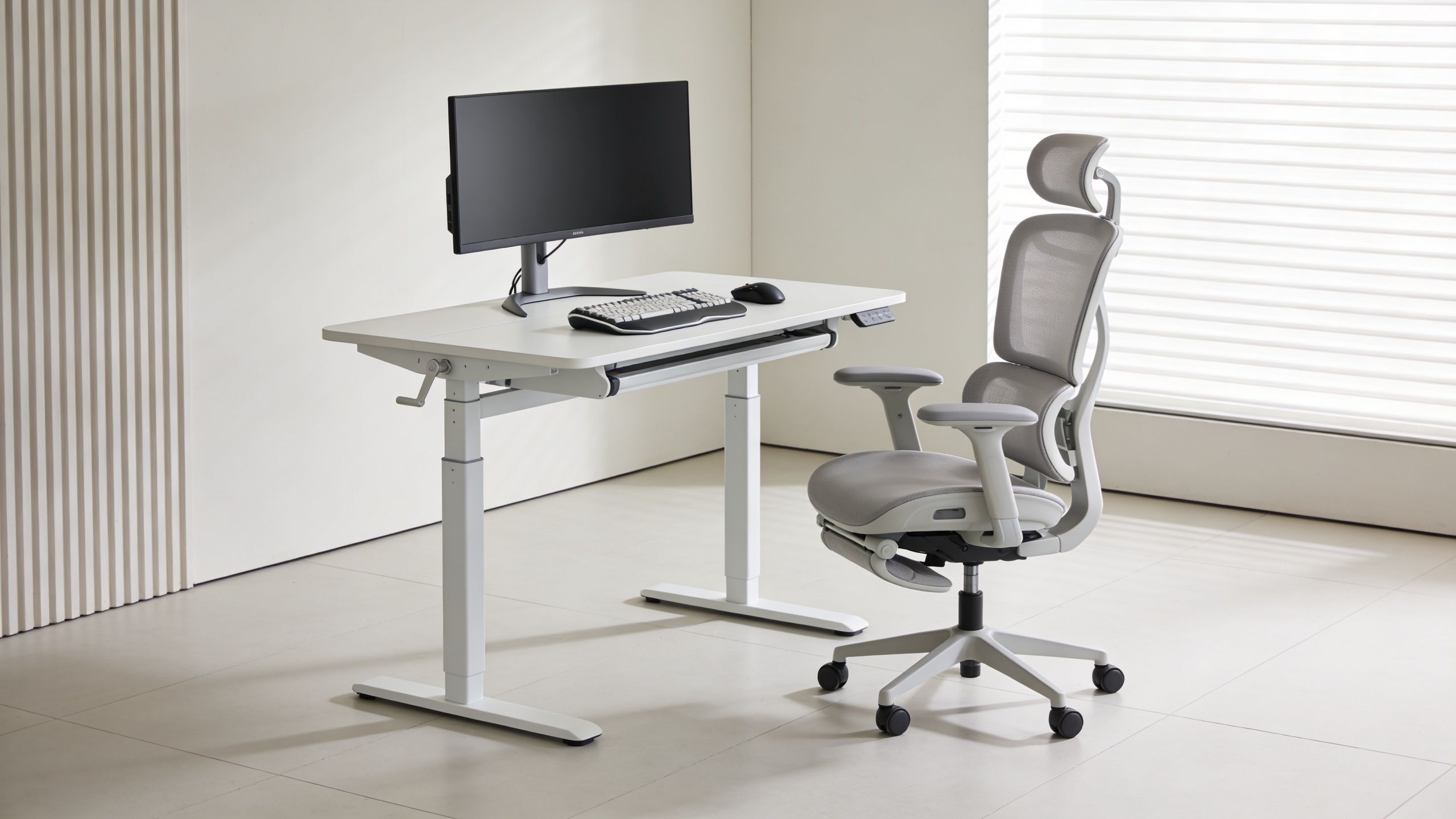
A common pitfall in office refreshes is that seating is upgraded, but desks, monitor support, and acoustic zoning are left untouched. The result is a mismatch. The chair encourages one posture while the rest of the setup forces another.
The chair must match the desk and screen
Arm support is a clear example. Chairs with 4D armrests enable synchronous upper limb support, offloading 30-40% of upper body weight from the spine and reducing erector spinae EMG activity by 22% according to this analysis of armrest support and back strain. That only works if the armrests align with the desk height and task.
If they sit too low, shoulders slump. If they sit too high, shoulders lift. If the desk can’t accommodate the chair, the body compensates.
Facilities teams should treat these elements as a single system:
- Chair for spinal and arm support
- Desk for correct working height, ideally with sit-stand capability where suitable
- Monitor arm to keep screens at a better viewing height
- Input devices that fit the task and the user
- Foot support when needed for shorter users or fixed desk conditions
A premium chair under a poorly set desk is still a compromised workstation.
Acoustics and zoning affect posture more than most teams expect
Noise changes behaviour. In loud open-plan environments, people often crane forward, tense the shoulders, and stay visually guarded. Privacy also matters. Staff who don’t have quiet spaces for calls or focus work tend to improvise with poor posture at desks that aren’t designed for that level of concentration.
That’s why acoustic zoning belongs inside an ergonomic strategy. Internal booths and meeting pods create protected settings for specific tasks. So do partitions. When the brief includes dividing noisy floorplates into calmer work zones, Logika office partitions are relevant because they help shape behaviour without demanding a full rebuild.
For organisations that need extra capacity outside the main floorplate, external pod solutions can also support a more controlled ergonomic environment. The value isn’t just privacy. It’s the ability to create a setting where chair, desk, acoustics, and task are aligned from the start.
A complete ergonomic ecosystem doesn’t rely on one hero product. It relies on coordinated decisions that reduce strain across the whole working day.
Smart Budgeting Pod Hire and the Circular Economy
Budget pressure often pushes teams toward the wrong decision. They save money on the purchase order and spend more later on replacements, complaints, and underused spaces. Smart budgeting looks at flexibility, lifespan, and how the workplace may change after the fit-out.
A workplace team doesn’t need to choose between quality and financial caution. It needs procurement models that spread cost sensibly and reduce waste. That’s where pod hire and circular thinking become practical, not theoretical.
Why flexible procurement beats false economy
A large capital purchase can lock a business into assumptions that may not hold. Headcount changes. Hybrid patterns shift. Departments move. A pod layout that suits today’s office may need adjusting later.
Flexible rental models solve that problem more elegantly than overcommitting upfront. Framery Subscribed gives organisations a way to access premium pods through a more flexible route, which can suit businesses protecting cash flow or testing new workplace zoning before committing long term.
That kind of model is especially useful when comparing scenarios such as:
- A £ upfront-heavy project that assumes fixed demand for years
- A more flexible monthly operating approach that allows workplace adaptation
- A phased rollout where pod performance and usage can be assessed before wider deployment
The point isn’t that every organisation should rent. The point is that flexibility has value, and that value is often ignored in traditional furniture budgeting.
Circular thinking reduces waste and extends value
Durability matters, but circularity matters too. Good workplace products should stay in use longer, be repairable where possible, and avoid unnecessary disposal. That applies to pods, chairs, and the wider furniture package.
Organisations looking at sustainability targets should pay close attention to products and partners that support reuse, refurbishment, and responsible end-of-life planning. A broader view of sustainability at Gibbsonn is useful here because the circular economy isn’t only about materials. It’s about designing workplaces that can evolve without constant waste.
There’s also a direct operational benefit. A business that can reconfigure, relocate, refurbish, or responsibly recover products has more control over future workplace cost.
For teams planning a refresh in stages, office furniture recycling options should sit inside the project plan from the start, not be treated as an afterthought once old assets become a disposal problem.
Good budgeting asks a harder question than “What does it cost today”. It asks “How much value will this still hold when the workplace changes”.
That is the right lens for chairs, pods, and every supporting element around them.
Create a Healthier Workplace Today
One specification decision can lock in years of comfort or years of complaints. Treat this refresh as a standards reset, not a furniture swap.
Set a clear rule. Chairs in open-plan areas should support regular posture changes and quick collaboration. Chairs inside pods should support upright, focused work in a more contained setting, where people often stay still for longer than they expect. That posture paradox gets missed in too many projects, and staff end up with seating that suits the floorplan on paper but not the way the space is used.
Support should not stop at the chair. If discomfort is already showing up in the neck and shoulders, practical guidance on non-surgical neck pain solutions gives employees useful support alongside better seating and workstation changes.
Use the refresh to test properly, write tighter standards, and buy by environment. Put the right chair in the right setting. Your absenteeism risk, replacement cycle, and employee experience all improve when procurement follows how people work, not how the office looks.
To plan a workplace that supports focus, privacy, and employee wellbeing, speak with Gibbsonn, book an appointment, and visit the showroom in Bishop's Stortford to test solutions in person. A direct conversation will help turn a chair upgrade into a smarter workplace strategy.